
Gridzy.Gallery
JavaScript ਲਾਇਬ੍ਰੇਰੀ
ਸਭ ਤੋਂ ਸ਼ਾਨਦਾਰ ਫੋਟੋ ਅਨੁਭਵ ਜੋ ਮੈਨੂੰ ਮਿਲਿਆ ਹੈ। ਅੰਤ ਵਿੱਚ ਕੋਈ ਸਮਝਦਾ ਹੈ ਕਿ ਇਹ ਸਹੀ ਕਿਵੇਂ ਕਰਨਾ ਹੈ!
ਮਿਲੋ ਪਰਸਿਕ – ਲਾਇਬ੍ਰੇਰੀ ਦਾ ਇੱਕ ਉਪਭੋਗਤਾ
ਤੇਜ਼ ਸੂਝ
1 ਮਿੰਟ ਦਾ ਵੀਡੀਓ ਟਿਊਟੋਰਿਅਲ
ਸਿਰਫ ਇੱਕ ਮਿੰਟ ਵਿੱਚ ਇਹ ਸਿੱਖੋ:
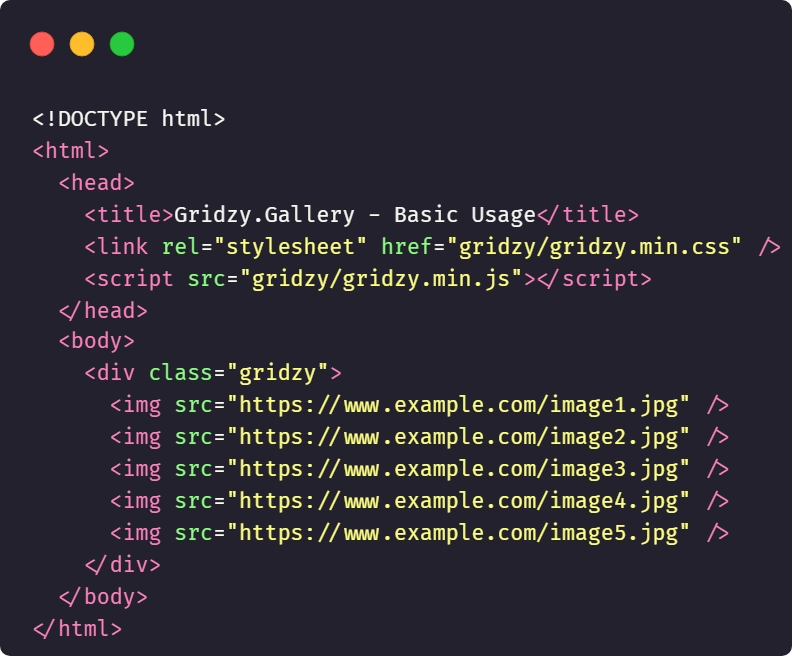
ਮੁੱਢਲੀ ਵਰਤੋਂ
ਸੰਰਚਨਾ
ਫਿਲਟਰ
ਦਿੱਖ


ਸੁਰਖੀ ਸ਼ੈਲੀਆਂ
ਆਸਾਨ ਤੇਜ਼ ਹੱਲਾਂ ਲਈ ਪੂਰਵ-ਪ੍ਰਭਾਸ਼ਿਤ ਸੁਰਖੀ ਸ਼ੈਲੀਆਂ
ਕੌਂਫਿਗਰ ਕੀਤੀ ਸੁਰਖੀ ਸ਼ੈਲੀ ਦੇਖਣ ਲਈ ਚਿੱਤਰਾਂ 'ਤੇ ਹੋਵਰ ਕਰੋ। ਦਿਖਾਈ ਗਈ ਬਿਲਟ-ਇਨ ਸ਼ੈਲੀ ਨੂੰ ਕੌਂਫਿਗਰ ਕਰਨ ਲਈ ਬਟਨਾਂ ਅਤੇ ਰੰਗ ਚੋਣਕਾਰਾਂ ਨਾਲ ਖੇਡੋ।
ਟੈਗਸ ਅਤੇ ਫਿਲਟਰ
ਆਪਣੇ ਚਿੱਤਰਾਂ ਨੂੰ ਵਧੇਰੇ ਢਾਂਚਾਗਤ ਤਰੀਕੇ ਨਾਲ ਪ੍ਰਦਰਸ਼ਿਤ ਕਰਨ ਲਈ
ਬਿਲਟ-ਇਨ ਫਿਲਟਰ ਸਿਸਟਮ ਬਹੁਤ ਲਚਕਦਾਰ ਹੈ। ਇਹ ਤੱਥ ਕਿ CSS ਚੋਣਕਾਰ ਫਿਲਟਰਿੰਗ ਲਈ ਵਰਤੇ ਜਾਂਦੇ ਹਨ ਅਸਲ ਵਿੱਚ ਲਗਭਗ ਕਿਸੇ ਵੀ ਕਿਸਮ ਦੇ ਫਿਲਟਰ ਨੂੰ ਸਮਰੱਥ ਬਣਾਉਂਦਾ ਹੈ.


ਬਹੁਤ ਅਨੁਕੂਲ
ਬਹੁਤ ਸਾਰੇ ਲਾਈਟਬਾਕਸਾਂ ਨਾਲ ਵਰਤੋਂ ਯੋਗ
ਗੈਲਰੀ ਨੂੰ ਕਿਸੇ ਵੀ ਲਾਈਟਬਾਕਸ ਨਾਲ ਜੋੜੋ। ਇਸ ਦੇ ਅਨੁਕੂਲ ਹੋਣ ਦੀ ਸੰਭਾਵਨਾ ਲਗਭਗ 100% ਹੈ। ਫੋਟੋਸਵਾਈਪ ਲਾਈਟਬਾਕਸ ਨੂੰ ਉਦਾਹਰਣ ਵਜੋਂ ਦੇਖਣ ਲਈ ਚਿੱਤਰਾਂ 'ਤੇ ਕਲਿੱਕ ਕਰੋ।


ਬਹੁਤ ਹੀ ਲਚਕਦਾਰ
ਕਸਟਮ ਸਟਾਈਲ ਬਣਾਓ
ਜੇਕਰ ਤੁਸੀਂ CSS ਤੋਂ ਜਾਣੂ ਹੋ, ਤਾਂ ਤੁਸੀਂ ਗੈਲਰੀ ਆਈਟਮਾਂ ਨੂੰ ਆਪਣੀ ਮਰਜ਼ੀ ਅਨੁਸਾਰ ਸਟਾਈਲ ਕਰ ਸਕਦੇ ਹੋ।
ਦਿਖਾਈ ਗਈ ਉਦਾਹਰਨ ਦਾ CSS:
/* CSS class: "gridzySkin-custom-sepia" */

@property --gridzySkin-custom-sepia--filter-sepia {
	initial-value: 1;
	inherits: true;
	syntax: "<number>";
}
@property --gridzySkin-custom-sepia--filter-contrast {
	initial-value: 1;
	inherits: true;
	syntax: "<number>";
}

.gridzySkin-custom-sepia > .gridzyItem {
	position: relative;
	overflow: unset;
	margin: -10px;
	border: 10px solid #fff;
	box-shadow: 1px 1px 5px rgba(0, 0, 0, .5);
	border-radius: 10px;
}

.gridzySkin-custom-sepia > .gridzyItem *:not(.gridzyCaption) {
	display: inline;
}

.gridzySkin-custom-sepia > .gridzyItem .gridzyCaption * {
	display: initial;
}

.gridzySkin-custom-sepia > .gridzyItem:nth-child(4n) {
	transform: rotate(-1deg);
}

.gridzySkin-custom-sepia > .gridzyItem:nth-child(4n+1) {
	transform: rotate(-.5deg);
}

.gridzySkin-custom-sepia > .gridzyItem:nth-child(4n+2) {
	transform: rotate(1deg);
}

.gridzySkin-custom-sepia > .gridzyItem:nth-child(4n+3) {
	transform: rotate(.5deg);
}

.gridzySkin-custom-sepia .gridzyImage {
	position: relative;
	vertical-align: middle;
	border-radius: 3px;

	--gridzySkin-custom-sepia--filter-sepia: 1;
	--gridzySkin-custom-sepia--filter-contrast: .7;
	filter: sepia(var(--gridzySkin-custom-sepia--filter-sepia)) contrast(var(--gridzySkin-custom-sepia--filter-contrast));
	transition: --gridzySkin-custom-sepia--filter-sepia .6s, --gridzySkin-custom-sepia--filter-contrast .6s;
}

.gridzySkin-custom-sepia > .gridzyItem:hover .gridzyImage {
	--gridzySkin-custom-sepia--filter-sepia: 0;
	--gridzySkin-custom-sepia--filter-contrast: 1;
}

.gridzySkin-custom-sepia .gridzyCaption {
	margin: 0;
	padding: .5em;
	position: absolute;
	z-index: 1;
	bottom: -.5em;
	top: auto;
	width: auto;
	max-width: calc(100% - 2em);
	height: fit-content;
	max-height: 100%;
	overflow: auto;
	box-sizing: border-box;
	background: rgba(238, 238, 238, .8);
	color: #000;
	box-shadow: 1px 1px 3px rgba(0, 0, 0, .3);
	opacity: 0;
	transition: opacity .3s;
}

.gridzySkin-custom-sepia > .gridzyItem:nth-child(3n) .gridzyCaption {
	transform: translateX(1000px) translateX(-50%) rotate(3deg);
}

.gridzySkin-custom-sepia > .gridzyItem:nth-child(3n+1) .gridzyCaption {
	transform: translateX(1000px) translateX(-50%) rotate(-3deg);
}

.gridzySkin-custom-sepia > .gridzyItem:nth-child(3n+2) .gridzyCaption {
	transform: translateX(1000px) translateX(-50%) rotate(-1deg);
}

.gridzySkin-custom-sepia > .gridzyItem:nth-child(5n) .gridzyCaption {
	left: calc(50% - 1000px);
}

.gridzySkin-custom-sepia > .gridzyItem:nth-child(5n+1) .gridzyCaption {
	left: calc(54% - 1000px);
}

.gridzySkin-custom-sepia > .gridzyItem:nth-child(5n+2) .gridzyCaption {
	left: calc(46% - 1000px);
}

.gridzySkin-custom-sepia > .gridzyItem:nth-child(5n+3) .gridzyCaption {
	left: calc(52% - 1000px);
}

.gridzySkin-custom-sepia > .gridzyItem:nth-child(5n+4) .gridzyCaption {
	left: calc(48% - 1000px);
}

.gridzySkin-custom-sepia > .gridzyItem:hover .gridzyCaption {
	opacity: 1;
}ਕੋਈ ਵੀ HTML ਵਰਤੋ
ਤੁਸੀਂ ਲਗਭਗ ਕਿਸੇ ਵੀ HTML ਦੀ ਵਰਤੋਂ ਕਰ ਸਕਦੇ ਹੋ। ਇੱਥੇ ਬਹੁਤ ਘੱਟ ਪਾਬੰਦੀਆਂ ਹਨ। ਇੱਥੇ ਵਿਖਾਈਆਂ ਗਈਆਂ ਉਦਾਹਰਣਾਂ ਦੋਵੇਂ ਇੱਕੋ ਜਿਹੇ ਵਿਜ਼ੂਅਲ ਨਤੀਜੇ ਪੇਸ਼ ਕਰਦੀਆਂ ਹਨ।
ਉਦਾਹਰਨ 1:
<ul class="gridzy gridzySkinClassic">
	<li>
		<a href="https://www.example.com/">
			<img class="gridzyImage" src="https://www.example.com/image1.jpg" />
			<span class="gridzyCaption">example caption 1</span>
		</a>
	</li>
	<li>
		<a href="https://www.example.com/">
			<img class="gridzyImage" src="https://www.example.com/image2.jpg" />
			<span class="gridzyCaption">example caption 2</span>
		</a>
	</li>
	...
</ul>
ਉਦਾਹਰਨ 2:
<section class="gridzy gridzySkinClassic">
	<figure>
		<img class="gridzyImage" src="https://www.example.com/image1.jpg" />
		<figcaption class="gridzyCaption">example caption 1</figcaption>
	</figure>
	<figure>
		<img class="gridzyImage" src="https://www.example.com/image2.jpg" />
		<figcaption class="gridzyCaption">example caption 2</figcaption>
	</figure>
	...
</section>
ਹੋਰ ਉਪਯੋਗੀ ਵਿਸ਼ੇਸ਼ਤਾਵਾਂ
ਆਲਸੀ ਲੋਡਿੰਗ
ਤੁਹਾਡੀਆਂ ਦੇਖੀਆਂ ਗਈਆਂ ਤਸਵੀਰਾਂ ਨੂੰ ਤੇਜ਼ੀ ਨਾਲ ਲੋਡ ਕਰਦਾ ਹੈ
ਇਹ ਸਿਰਫ਼ ਉਹਨਾਂ ਚਿੱਤਰਾਂ ਨੂੰ ਲੋਡ ਕਰਦਾ ਹੈ ਜੋ ਦ੍ਰਿਸ਼ਮਾਨ ਖੇਤਰ ਦੇ ਨੇੜੇ ਹਨ। ਇਸ ਲਈ ਦਿਖਾਈ ਦੇਣ ਵਾਲੀਆਂ ਤਸਵੀਰਾਂ ਲਈ ਹੋਰ ਬੈਂਡਵਿਡਥ।
API
ਤੁਹਾਨੂੰ ਹੋਰ ਬਹੁਤ ਕੁਝ ਕਰਨ ਦੀ ਇਜਾਜ਼ਤ ਦਿੰਦਾ ਹੈ
ਇਹ ਤੁਹਾਨੂੰ ਪ੍ਰੋਗਰਾਮਾਂ ਨਾਲ ਚਿੱਤਰਾਂ ਨੂੰ ਜੋੜਨ ਅਤੇ ਹਟਾਉਣ, ਵਿਕਲਪ ਬਦਲਣ ਜਾਂ ਇਵੈਂਟਾਂ 'ਤੇ ਪ੍ਰਤੀਕਿਰਿਆ ਕਰਨ ਦੀ ਇਜਾਜ਼ਤ ਦਿੰਦਾ ਹੈ।
ਐਕਸਟੈਂਸ਼ਨਾਂ
ਤੁਹਾਨੂੰ ਵਿਅਕਤੀਗਤ ਸਥਿਤੀਆਂ ਲਈ ਹੱਲ ਪ੍ਰਦਾਨ ਕਰਦਾ ਹੈ
ਇਹ ਬਲੌਗ ਲੇਖਾਂ ਦਾ ਸੰਗ੍ਰਹਿ ਹੈ ਜੋ ਸਮੇਂ ਦੇ ਨਾਲ ਵਧਦਾ ਹੈ ਅਤੇ Gridzy.Gallery ਆਸਾਨੀ ਨਾਲ ਵਧਾਉਣ ਲਈ ਮਦਦਗਾਰ ਕੋਡ ਸਨਿੱਪਟ ਰੱਖਦਾ ਹੈ।
ਲਾਇਬ੍ਰੇਰੀ ਬਾਰੇ ਉਪਭੋਗਤਾ
ਚਲੋ ਕਾਰੋਬਾਰ 'ਤੇ ਉਤਰੀਏ!
ਯੋਜਨਾਵਾਂ ਦੀ ਜਾਂਚ ਕਰਨ ਲਈ ਬਟਨ 'ਤੇ ਕਲਿੱਕ ਕਰੋ!