
Gridzy.Gallery
ജാവാസ്ക്രിപ്റ്റ് ലൈബ്രറി
ഞാൻ കണ്ടെത്തിയ ഏറ്റവും മികച്ച ഫോട്ടോ അനുഭവം. ഇത് എങ്ങനെ ശരിയായി ചെയ്യണമെന്ന് ഒടുവിൽ ആരെങ്കിലും മനസ്സിലാക്കുന്നു!
മിലോ പെർസിക് - ലൈബ്രറിയുടെ ഉപയോക്താവ്
ദ്രുത ഉൾക്കാഴ്ച
1 മിനിറ്റ് വീഡിയോ ട്യൂട്ടോറിയൽ
ഒരു മിനിറ്റിനുള്ളിൽ ഇത് പഠിക്കുക:
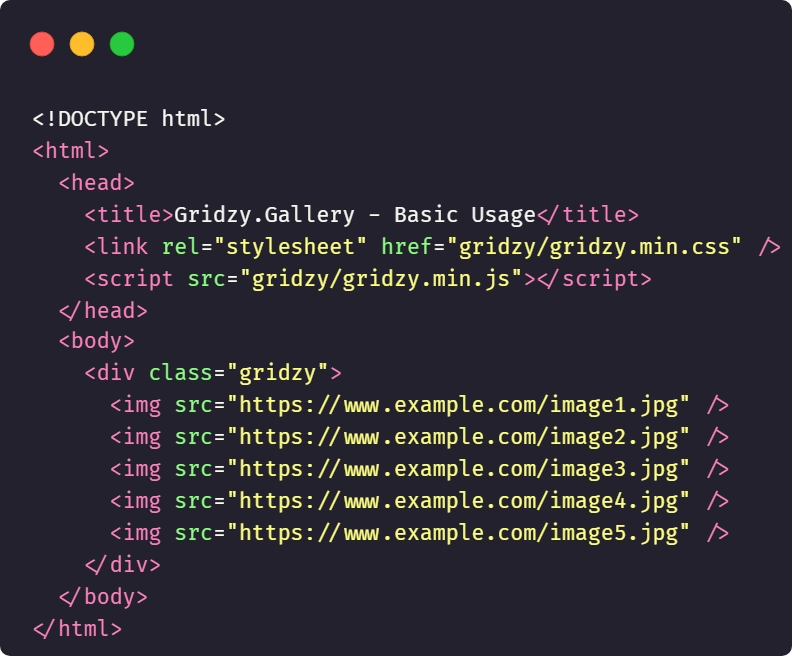
അടിസ്ഥാന ഉപയോഗം
കോൺഫിഗറേഷൻ
ഫിൽട്ടറുകൾ
രൂപഭാവം


അടിക്കുറിപ്പ് ശൈലികൾ
എളുപ്പമുള്ള ദ്രുത പരിഹാരങ്ങൾക്കായി മുൻകൂട്ടി നിശ്ചയിച്ചിട്ടുള്ള അടിക്കുറിപ്പ് ശൈലികൾ
ക്രമീകരിച്ച അടിക്കുറിപ്പ് ശൈലി കാണാൻ ചിത്രങ്ങൾ ഹോവർ ചെയ്യുക. കാണിച്ചിരിക്കുന്ന ബിൽറ്റ്-ഇൻ ശൈലി കോൺഫിഗർ ചെയ്യാൻ ബട്ടണുകളും കളർ പിക്കറുകളും ഉപയോഗിച്ച് പ്ലേ ചെയ്യുക.
ടാഗുകളും ഫിൽട്ടറുകളും
കൂടുതൽ ഘടനാപരമായ രീതിയിൽ നിങ്ങളുടെ ചിത്രങ്ങൾ പ്രദർശിപ്പിക്കുന്നതിന്
ബിൽറ്റ്-ഇൻ ഫിൽട്ടർ സിസ്റ്റം വളരെ ഫ്ലെക്സിബിൾ ആണ്. CSS സെലക്ടറുകൾ ഫിൽട്ടറിംഗിനായി ഉപയോഗിക്കുന്നത് യഥാർത്ഥത്തിൽ ഏത് തരത്തിലുള്ള ഫിൽട്ടറും പ്രവർത്തനക്ഷമമാക്കുന്നു.


ഉയർന്ന അനുയോജ്യത
നിരവധി ലൈറ്റ്ബോക്സുകൾക്കൊപ്പം ഉപയോഗിക്കാം
ഏതെങ്കിലും ലൈറ്റ്ബോക്സുമായി ഗാലറി സംയോജിപ്പിക്കുക. ഇത് പൊരുത്തപ്പെടാനുള്ള സാധ്യത ഏതാണ്ട് 100% ആണ്. ഫോട്ടോസ്വൈപ്പ് ലൈറ്റ്ബോക്സ് ഉദാഹരണമായി കാണാൻ ചിത്രങ്ങളിൽ ക്ലിക്ക് ചെയ്യുക.
റെഡിമെയ്ഡ് കോഡ് സ്നിപ്പെറ്റുകളുള്ള ബ്ലോഗ് ലേഖനങ്ങളുണ്ട്:


ഉയർന്ന ഫ്ലെക്സിബിൾ
ഇഷ്ടാനുസൃത ശൈലികൾ സൃഷ്ടിക്കുക
നിങ്ങൾക്ക് CSS പരിചയമുണ്ടെങ്കിൽ, നിങ്ങൾക്ക് ആവശ്യമുള്ള രീതിയിൽ ഗാലറി ഇനങ്ങൾ സ്റ്റൈൽ ചെയ്യാൻ കഴിയും.
കാണിച്ചിരിക്കുന്ന ഉദാഹരണത്തിൻ്റെ CSS:
/* CSS class: "gridzySkin-custom-sepia" */

@property --gridzySkin-custom-sepia--filter-sepia {
	initial-value: 1;
	inherits: true;
	syntax: "<number>";
}
@property --gridzySkin-custom-sepia--filter-contrast {
	initial-value: 1;
	inherits: true;
	syntax: "<number>";
}

.gridzySkin-custom-sepia > .gridzyItem {
	position: relative;
	overflow: unset;
	margin: -10px;
	border: 10px solid #fff;
	box-shadow: 1px 1px 5px rgba(0, 0, 0, .5);
	border-radius: 10px;
}

.gridzySkin-custom-sepia > .gridzyItem *:not(.gridzyCaption) {
	display: inline;
}

.gridzySkin-custom-sepia > .gridzyItem .gridzyCaption * {
	display: initial;
}

.gridzySkin-custom-sepia > .gridzyItem:nth-child(4n) {
	transform: rotate(-1deg);
}

.gridzySkin-custom-sepia > .gridzyItem:nth-child(4n+1) {
	transform: rotate(-.5deg);
}

.gridzySkin-custom-sepia > .gridzyItem:nth-child(4n+2) {
	transform: rotate(1deg);
}

.gridzySkin-custom-sepia > .gridzyItem:nth-child(4n+3) {
	transform: rotate(.5deg);
}

.gridzySkin-custom-sepia .gridzyImage {
	position: relative;
	vertical-align: middle;
	border-radius: 3px;

	--gridzySkin-custom-sepia--filter-sepia: 1;
	--gridzySkin-custom-sepia--filter-contrast: .7;
	filter: sepia(var(--gridzySkin-custom-sepia--filter-sepia)) contrast(var(--gridzySkin-custom-sepia--filter-contrast));
	transition: --gridzySkin-custom-sepia--filter-sepia .6s, --gridzySkin-custom-sepia--filter-contrast .6s;
}

.gridzySkin-custom-sepia > .gridzyItem:hover .gridzyImage {
	--gridzySkin-custom-sepia--filter-sepia: 0;
	--gridzySkin-custom-sepia--filter-contrast: 1;
}

.gridzySkin-custom-sepia .gridzyCaption {
	margin: 0;
	padding: .5em;
	position: absolute;
	z-index: 1;
	bottom: -.5em;
	top: auto;
	width: auto;
	max-width: calc(100% - 2em);
	height: fit-content;
	max-height: 100%;
	overflow: auto;
	box-sizing: border-box;
	background: rgba(238, 238, 238, .8);
	color: #000;
	box-shadow: 1px 1px 3px rgba(0, 0, 0, .3);
	opacity: 0;
	transition: opacity .3s;
}

.gridzySkin-custom-sepia > .gridzyItem:nth-child(3n) .gridzyCaption {
	transform: translateX(1000px) translateX(-50%) rotate(3deg);
}

.gridzySkin-custom-sepia > .gridzyItem:nth-child(3n+1) .gridzyCaption {
	transform: translateX(1000px) translateX(-50%) rotate(-3deg);
}

.gridzySkin-custom-sepia > .gridzyItem:nth-child(3n+2) .gridzyCaption {
	transform: translateX(1000px) translateX(-50%) rotate(-1deg);
}

.gridzySkin-custom-sepia > .gridzyItem:nth-child(5n) .gridzyCaption {
	left: calc(50% - 1000px);
}

.gridzySkin-custom-sepia > .gridzyItem:nth-child(5n+1) .gridzyCaption {
	left: calc(54% - 1000px);
}

.gridzySkin-custom-sepia > .gridzyItem:nth-child(5n+2) .gridzyCaption {
	left: calc(46% - 1000px);
}

.gridzySkin-custom-sepia > .gridzyItem:nth-child(5n+3) .gridzyCaption {
	left: calc(52% - 1000px);
}

.gridzySkin-custom-sepia > .gridzyItem:nth-child(5n+4) .gridzyCaption {
	left: calc(48% - 1000px);
}

.gridzySkin-custom-sepia > .gridzyItem:hover .gridzyCaption {
	opacity: 1;
}ഏതെങ്കിലും HTML ഉപയോഗിക്കുക
നിങ്ങൾക്ക് ഏതാണ്ട് ഏത് HTML ഉപയോഗിക്കാനും കഴിയും. വളരെ കുറച്ച് നിയന്ത്രണങ്ങളേ ഉള്ളൂ. ഇവിടെ കാണിച്ചിരിക്കുന്ന ഉദാഹരണങ്ങൾ രണ്ടും ഒരേ ദൃശ്യ ഫലം നൽകുന്നു.
ഉദാഹരണം 1:
<ul class="gridzy gridzySkinClassic">
	<li>
		<a href="https://www.example.com/">
			<img class="gridzyImage" src="https://www.example.com/image1.jpg" />
			<span class="gridzyCaption">example caption 1</span>
		</a>
	</li>
	<li>
		<a href="https://www.example.com/">
			<img class="gridzyImage" src="https://www.example.com/image2.jpg" />
			<span class="gridzyCaption">example caption 2</span>
		</a>
	</li>
	...
</ul>
ഉദാഹരണം 2:
<section class="gridzy gridzySkinClassic">
	<figure>
		<img class="gridzyImage" src="https://www.example.com/image1.jpg" />
		<figcaption class="gridzyCaption">example caption 1</figcaption>
	</figure>
	<figure>
		<img class="gridzyImage" src="https://www.example.com/image2.jpg" />
		<figcaption class="gridzyCaption">example caption 2</figcaption>
	</figure>
	...
</section>
കൂടുതൽ ഉപയോഗപ്രദമായ സവിശേഷതകൾ
അലസമായ ലോഡിംഗ്
നിങ്ങൾ കണ്ട ചിത്രങ്ങൾ വേഗത്തിൽ ലോഡുചെയ്യുന്നു
ദൃശ്യമായ ഏരിയയോട് ചേർന്നുള്ള ചിത്രങ്ങൾ മാത്രമേ ഇത് ലോഡ് ചെയ്യുന്നുള്ളൂ. അതിനാൽ ദൃശ്യമായ ചിത്രങ്ങൾക്ക് കൂടുതൽ ബാൻഡ്വിഡ്ത്ത്.
API
കൂടുതൽ ചെയ്യാൻ നിങ്ങളെ അനുവദിക്കുന്നു
പ്രോഗ്രമാറ്റിക്കായി ചിത്രങ്ങൾ ചേർക്കാനും നീക്കം ചെയ്യാനും ഓപ്ഷനുകൾ മാറ്റാനും അല്ലെങ്കിൽ ഇവൻ്റുകളോട് പ്രതികരിക്കാനും ഇത് നിങ്ങളെ അനുവദിക്കുന്നു.
വിപുലീകരണങ്ങൾ
വ്യക്തിഗത സാഹചര്യങ്ങൾക്കുള്ള പരിഹാരങ്ങൾ നിങ്ങൾക്ക് നൽകുന്നു
കാലക്രമേണ വളരുന്നതും Gridzy.Gallery വിപുലീകരിക്കാൻ സഹായകമായ കോഡ് സ്നിപ്പെറ്റുകൾ അടങ്ങിയതുമായ ബ്ലോഗ് ലേഖനങ്ങളുടെ ഒരു ശേഖരമാണിത്.
ലൈബ്രറിയെക്കുറിച്ച് ഉപയോക്താവ്
നമുക്ക് കാര്യത്തിലേക്ക് ഇറങ്ങാം!
പ്ലാനുകൾ പരിശോധിക്കാൻ ബട്ടണിൽ ക്ലിക്ക് ചെയ്യുക!