
Gridzy.Gallery
JavaScript Library
Most amazing photo experience mi eva find. Finally sombadi andastan how fi do dis RIGHT!
Milo Persic – a user a di library
Quick Insight
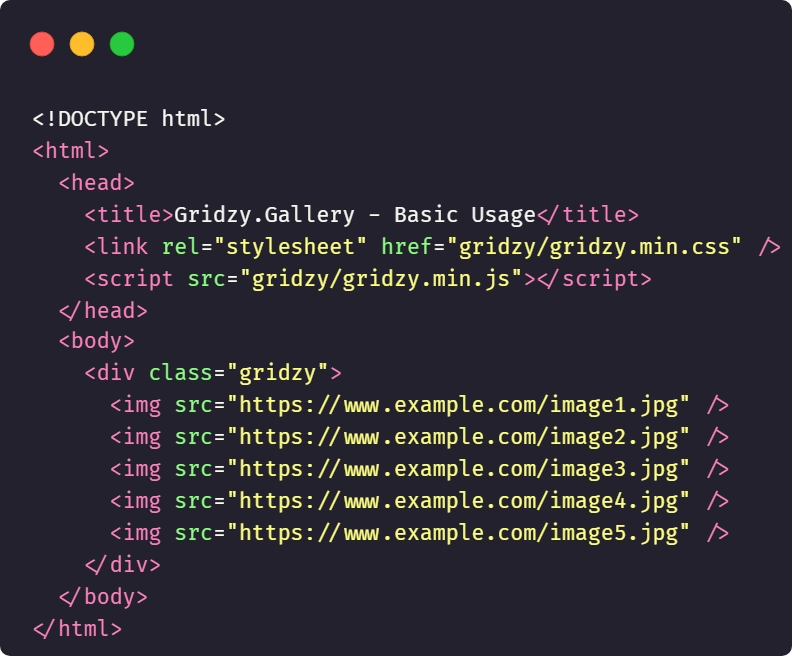
1 minute video tutorial
Laan dis inna jus a minute:
Basic usage
Configuration
Filters
Luks


Caption Styles
Predefined caption styles fi easy quick solutions
Hover di images fi si di configured caption style. Play wid di buttons an color pickers fi configure di shown built-in style.
Tags & Filters
Fi display yuh images inna a more structured way
Di built-in filter system is extremely flexible. Di fact dat CSS selectors dem use fi filtering actually mek it possible fi almost any type a filter.


Highly Compatible
Usable Wid Many Lightboxes
Combine di gallery wid any lightbox. Di probability dat it compatible is almost 100%. Click di images fi si di PhotoSwipe lightbox as an example.
Deh have blog articles wid ready-made code snippets:


Highly Flexible
Create Custom Styles
If yuh know CSS, yuh can style di gallery items di way yuh waan.
CSS a shown example:
/* CSS class: "gridzySkin-custom-sepia" */

@property --gridzySkin-custom-sepia--filter-sepia {
	initial-value: 1;
	inherits: true;
	syntax: "<number>";
}
@property --gridzySkin-custom-sepia--filter-contrast {
	initial-value: 1;
	inherits: true;
	syntax: "<number>";
}

.gridzySkin-custom-sepia > .gridzyItem {
	position: relative;
	overflow: unset;
	margin: -10px;
	border: 10px solid #fff;
	box-shadow: 1px 1px 5px rgba(0, 0, 0, .5);
	border-radius: 10px;
}

.gridzySkin-custom-sepia > .gridzyItem *:not(.gridzyCaption) {
	display: inline;
}

.gridzySkin-custom-sepia > .gridzyItem .gridzyCaption * {
	display: initial;
}

.gridzySkin-custom-sepia > .gridzyItem:nth-child(4n) {
	transform: rotate(-1deg);
}

.gridzySkin-custom-sepia > .gridzyItem:nth-child(4n+1) {
	transform: rotate(-.5deg);
}

.gridzySkin-custom-sepia > .gridzyItem:nth-child(4n+2) {
	transform: rotate(1deg);
}

.gridzySkin-custom-sepia > .gridzyItem:nth-child(4n+3) {
	transform: rotate(.5deg);
}

.gridzySkin-custom-sepia .gridzyImage {
	position: relative;
	vertical-align: middle;
	border-radius: 3px;

	--gridzySkin-custom-sepia--filter-sepia: 1;
	--gridzySkin-custom-sepia--filter-contrast: .7;
	filter: sepia(var(--gridzySkin-custom-sepia--filter-sepia)) contrast(var(--gridzySkin-custom-sepia--filter-contrast));
	transition: --gridzySkin-custom-sepia--filter-sepia .6s, --gridzySkin-custom-sepia--filter-contrast .6s;
}

.gridzySkin-custom-sepia > .gridzyItem:hover .gridzyImage {
	--gridzySkin-custom-sepia--filter-sepia: 0;
	--gridzySkin-custom-sepia--filter-contrast: 1;
}

.gridzySkin-custom-sepia .gridzyCaption {
	margin: 0;
	padding: .5em;
	position: absolute;
	z-index: 1;
	bottom: -.5em;
	top: auto;
	width: auto;
	max-width: calc(100% - 2em);
	height: fit-content;
	max-height: 100%;
	overflow: auto;
	box-sizing: border-box;
	background: rgba(238, 238, 238, .8);
	color: #000;
	box-shadow: 1px 1px 3px rgba(0, 0, 0, .3);
	opacity: 0;
	transition: opacity .3s;
}

.gridzySkin-custom-sepia > .gridzyItem:nth-child(3n) .gridzyCaption {
	transform: translateX(1000px) translateX(-50%) rotate(3deg);
}

.gridzySkin-custom-sepia > .gridzyItem:nth-child(3n+1) .gridzyCaption {
	transform: translateX(1000px) translateX(-50%) rotate(-3deg);
}

.gridzySkin-custom-sepia > .gridzyItem:nth-child(3n+2) .gridzyCaption {
	transform: translateX(1000px) translateX(-50%) rotate(-1deg);
}

.gridzySkin-custom-sepia > .gridzyItem:nth-child(5n) .gridzyCaption {
	left: calc(50% - 1000px);
}

.gridzySkin-custom-sepia > .gridzyItem:nth-child(5n+1) .gridzyCaption {
	left: calc(54% - 1000px);
}

.gridzySkin-custom-sepia > .gridzyItem:nth-child(5n+2) .gridzyCaption {
	left: calc(46% - 1000px);
}

.gridzySkin-custom-sepia > .gridzyItem:nth-child(5n+3) .gridzyCaption {
	left: calc(52% - 1000px);
}

.gridzySkin-custom-sepia > .gridzyItem:nth-child(5n+4) .gridzyCaption {
	left: calc(48% - 1000px);
}

.gridzySkin-custom-sepia > .gridzyItem:hover .gridzyCaption {
	opacity: 1;
}Yuz any HTML
Yuh can use almost any HTML. A ongl likl bit a restricshan de de. Di examples dem weh yuh show yah both produce di same visual result.
Example 1:
<ul class="gridzy gridzySkinClassic">
	<li>
		<a href="https://www.example.com/">
			<img class="gridzyImage" src="https://www.example.com/image1.jpg" />
			<span class="gridzyCaption">example caption 1</span>
		</a>
	</li>
	<li>
		<a href="https://www.example.com/">
			<img class="gridzyImage" src="https://www.example.com/image2.jpg" />
			<span class="gridzyCaption">example caption 2</span>
		</a>
	</li>
	...
</ul>
Example 2:
<section class="gridzy gridzySkinClassic">
	<figure>
		<img class="gridzyImage" src="https://www.example.com/image1.jpg" />
		<figcaption class="gridzyCaption">example caption 1</figcaption>
	</figure>
	<figure>
		<img class="gridzyImage" src="https://www.example.com/image2.jpg" />
		<figcaption class="gridzyCaption">example caption 2</figcaption>
	</figure>
	...
</section>
More Useful Features
Lazy Loading
Load yuh viewed images faster
Dis load only dem images deh weh deh close to di visible area. So more bandwidth fi visible images.
API
Allow yuh fi do much more
Dis allow yuh fi add an tek weh images programmatically, change options or react to events.
Extensions
Gi yuh solutions fi individual scenarios
A one collection a blog articles weh grow ova time an contain helpful code snippets fi easily extend Gridzy.Gallery .
User About di Library
Mek wi staat bizniz!
Click di button fi check out di plans!